Inilah daftar harga BlackBerry Juni 2011. Bagi teman-teman yang ingin membeli BlackBerry, maka sangat cocok bila kamu mencocok harga terlebih dahulu dengan daftar harga BlackBerry yang akan dipostingan pada tulisan ini. Adapun daftar harga BlackBerry pada bulan Juni 2011 adalah sebagai berikut di bawah ini:
Harga BlackBerry Juni 2011
- BLACKBERRY GEMINI: Harga Baru Rp1.999.000
- BLACKBERRY GEMINI WHITE: Harga Baru Rp2.100.000
- BLACKBERRY ONYX 2 9780 Black: Harga Baru Rp3.900.000
- BLACKBERRY TORCH 9800 (WHITE): Harga Baru Rp4.700.000
- BLACKBERRY TORCH 9800 (BLACK): Harga Baru Rp4.500.000
- BLACKBERRY TORCH 9800 (RED): Harga Baru Rp4.750.000
- BLACKBERRY GEMINI 9300 (GREY): Harga Baru Rp2.650.000
- BLACKBERRY ONIX2 9780 (WHITE): Harga Baru Rp4.000.000
- BLACKBERRY ONIX2 9780 (BLACK) NON LOGO: Harga Baru Rp4.000.000
Nah... setelah mengetahui dari daftar harga BlackBerry Juni 2011 diatas, maka tentu ketika teman-teman mau membeli BlackBerry pada counter-counter handphone terdekat dengan tempat kamu, maka terlebih dahulu kamu sudah dapat mencocok harga yang tepat dan sekiranya tidak akan bisa merugikan teman-teman ketika ingin membelinya.
Tampilkan postingan dengan label blackberry software. Tampilkan semua postingan
Tampilkan postingan dengan label blackberry software. Tampilkan semua postingan
Selasa, 31 Mei 2011
Minggu, 01 Mei 2011
Harga Blackberry Terbaru
Berikut daftar Harga BlackBerry April – Mei 2011 Terbaru :
BlackBerry Torch 9800 : Gr.Resmi:Rp.4.900.000
BlackBerry Bold 9700 : Harga Baru : Rp.3.850.000,- Harga Second : Rp.2.850.000,-
BlackBerry Bold 9780 : Harga Baru : Rp. 4,150,000,-
BlackBerry 9300 Curve 3G : Harga Baru : Rp. 2,550,000,-
BlackBerry Bold 9000 : Harga Second: Rp.1.850.000,
BlackBerry 9800 Torch : Harga Baru : Rp.4.900.000,-
BlackBerry Bold 9650 : Harga Second : Rp.3.000.000,-
BlackBerry Pearl 8120 : Harga Second : Rp.Rp.1.050.000,-
BlackBerry Tour 9630 : Harga Second : Rp.1.900.000,-
BlackBerry Pearl 3G 9100 : Harga Baru : Rp.3.150.000,-
BlackBerry Pearl 3G 9105 : Harga Baru : Rp.2.520.000,-
BlackBerry Storm2 9550 : Harga Second: Rp.2.450.000,-
BlackBerry 8320 : Harga Second : Rp.1.000.000,-
BlackBerry Gemini 8520 : Harga Baru : Rp.2.175.000,- Harga Second : Rp.1.600.000,-
BlackBerry Javelin 8900 : Harga Second: Rp. 1,950,000,-
BlackBerry Storm 9500 : Harga Second: Rp.1.800.000,-
BlackBerry 8220 : Harga Second : Rp.1.200.000,-
BlackBerry Curve 8310 : Harga Second : Rp.900.000,-
BlackBerry Aries 8530 : Baru: Rp. 2,150,000,- Harga Second: Rp. 1,600,000,-
BlackBerry Torch 9800 : Gr.Resmi:Rp.4.900.000
BlackBerry Bold 9700 : Harga Baru : Rp.3.850.000,- Harga Second : Rp.2.850.000,-
BlackBerry Bold 9780 : Harga Baru : Rp. 4,150,000,-
BlackBerry 9300 Curve 3G : Harga Baru : Rp. 2,550,000,-
BlackBerry Bold 9000 : Harga Second: Rp.1.850.000,
BlackBerry 9800 Torch : Harga Baru : Rp.4.900.000,-
BlackBerry Bold 9650 : Harga Second : Rp.3.000.000,-
BlackBerry Pearl 8120 : Harga Second : Rp.Rp.1.050.000,-
BlackBerry Tour 9630 : Harga Second : Rp.1.900.000,-
BlackBerry Pearl 3G 9100 : Harga Baru : Rp.3.150.000,-
BlackBerry Pearl 3G 9105 : Harga Baru : Rp.2.520.000,-
BlackBerry Storm2 9550 : Harga Second: Rp.2.450.000,-
BlackBerry 8320 : Harga Second : Rp.1.000.000,-
BlackBerry Gemini 8520 : Harga Baru : Rp.2.175.000,- Harga Second : Rp.1.600.000,-
BlackBerry Javelin 8900 : Harga Second: Rp. 1,950,000,-
BlackBerry Storm 9500 : Harga Second: Rp.1.800.000,-
BlackBerry 8220 : Harga Second : Rp.1.200.000,-
BlackBerry Curve 8310 : Harga Second : Rp.900.000,-
BlackBerry Aries 8530 : Baru: Rp. 2,150,000,- Harga Second: Rp. 1,600,000,-

HARGA HP BLACKBERRY TERBARU
BlackBerry Torch 9800
Update:27/03/2011
Gr.Resmi:Rp.4.900.000,-
Harga Bks:Rp.- BlackBerry Bold 9780
Update:27/03/2011
Gr.Resmi:Rp.4.150.000,-
Harga Bks:Rp.-
BlackBerry Bold 9700
Update:27/03/2011
Gr.Resmi:Rp.3.850.000,-
Harga Bks:Rp.2.850.000,-
BlackBerry Pearl 3G 9105
Update:27/03/2011
Gr.Resmi:Rp.2.525.000,-
Harga Bks:Rp.-
BlackBerry Pearl 3G 9100
Update:27/03/2011
Gr.Resmi:Rp.3.150.000,-
Harga Bks:Rp.-
Black Berry Bold 9000
Update:27/03/2011
Gr.Resmi:Rp.-
Harga Bks:Rp.1.850.000,-
BlackBerry Bold 9650
pdate:27/03/2011
Gr.Resmi:Rp.-
Harga Bks:Rp.3.000.000,-
BlackBerry Curve 8520 Gemini
Update:27/03/2011
Gr.Resmi:Rp.2.175.000,-
Harga Bks:Rp.1.600.000,-
BlackBerry Curve 3G 9300
Update:27/03/2011
Gr.Resmi:Rp.2.550.000,-
Harga Bks:Rp.-
BlackBerry Javelin 8900
Update:27/03/2011
Gr.Resmi:Rp.-
Harga Bks:Rp.1.950.000,-
BlackBerry Storm2 9550 Odin
Update:27/03/2011
Gr.Resmi:Rp.-
Harga Bks:Rp.2.450.000,-
BlackBerry Tour 9630
Update:27/03/2011
Gr.Resmi:Rp.-
Harga Bks:Rp.1.900.000,-
BlackBerry Storm 9500
Update:27/03/2011
Gr.Resmi:Rp.-
Harga Bks:Rp.1.800.000,-
BlackBerry 8320
Update:27/03/2011
Gr.Resmi:Rp.-
Harga Bks:Rp.1.000.000,-
BlackBerry Curve 8310
Update:27/03/2011
Gr.Resmi:Rp.-
Harga Bks:Rp.900.000,-
BlackBerry 8220
Update:27/03/2011
Gr.Resmi:Rp.-
Harga Bks:Rp.1.200.000,-
BlackBerry Curve 8520
Update:18/05/2010
Gr.Resmi:Rp.3.500.000,-
Harga Bks:Rp.-
Black Berry 3G
Update:02/05/2010
Gr.Resmi:Rp.-
Harga Bks:Rp.-
BlackBerry Pearl 8100
Update:28/06/2010
Gr.Resmi:Rp.-
Harga Bks:Rp.900.000,-
BlackBerry 8820
Update:07/08/2010
Gr.Resmi:Rp.-
Harga Bks:Rp.1.000.000,-
BlackBerry Pearl 8120
Update:28/06/2010
Gr.Resmi:Rp.-
Harga Bks:Rp.1.050.000,-
Update:27/03/2011
Gr.Resmi:Rp.4.900.000,-
Harga Bks:Rp.- BlackBerry Bold 9780
Update:27/03/2011
Gr.Resmi:Rp.4.150.000,-
Harga Bks:Rp.-
BlackBerry Bold 9700
Update:27/03/2011
Gr.Resmi:Rp.3.850.000,-
Harga Bks:Rp.2.850.000,-
BlackBerry Pearl 3G 9105
Update:27/03/2011
Gr.Resmi:Rp.2.525.000,-
Harga Bks:Rp.-
BlackBerry Pearl 3G 9100
Update:27/03/2011
Gr.Resmi:Rp.3.150.000,-
Harga Bks:Rp.-
Black Berry Bold 9000
Update:27/03/2011
Gr.Resmi:Rp.-
Harga Bks:Rp.1.850.000,-
BlackBerry Bold 9650
pdate:27/03/2011
Gr.Resmi:Rp.-
Harga Bks:Rp.3.000.000,-
BlackBerry Curve 8520 Gemini
Update:27/03/2011
Gr.Resmi:Rp.2.175.000,-
Harga Bks:Rp.1.600.000,-
BlackBerry Curve 3G 9300
Update:27/03/2011
Gr.Resmi:Rp.2.550.000,-
Harga Bks:Rp.-
BlackBerry Javelin 8900
Update:27/03/2011
Gr.Resmi:Rp.-
Harga Bks:Rp.1.950.000,-
BlackBerry Storm2 9550 Odin
Update:27/03/2011
Gr.Resmi:Rp.-
Harga Bks:Rp.2.450.000,-
BlackBerry Tour 9630
Update:27/03/2011
Gr.Resmi:Rp.-
Harga Bks:Rp.1.900.000,-
BlackBerry Storm 9500
Update:27/03/2011
Gr.Resmi:Rp.-
Harga Bks:Rp.1.800.000,-
BlackBerry 8320
Update:27/03/2011
Gr.Resmi:Rp.-
Harga Bks:Rp.1.000.000,-
BlackBerry Curve 8310
Update:27/03/2011
Gr.Resmi:Rp.-
Harga Bks:Rp.900.000,-
BlackBerry 8220
Update:27/03/2011
Gr.Resmi:Rp.-
Harga Bks:Rp.1.200.000,-
BlackBerry Curve 8520
Update:18/05/2010
Gr.Resmi:Rp.3.500.000,-
Harga Bks:Rp.-
Black Berry 3G
Update:02/05/2010
Gr.Resmi:Rp.-
Harga Bks:Rp.-
BlackBerry Pearl 8100
Update:28/06/2010
Gr.Resmi:Rp.-
Harga Bks:Rp.900.000,-
BlackBerry 8820
Update:07/08/2010
Gr.Resmi:Rp.-
Harga Bks:Rp.1.000.000,-
BlackBerry Pearl 8120
Update:28/06/2010
Gr.Resmi:Rp.-
Harga Bks:Rp.1.050.000,-
Info Harga Blackberry
TYPE & SPESIFIKASI BLACKBERRY
BLACKBERRY 9630
BLACKBERRY 9800
BLACKBERRY 9650
BLACKBERRY 9700 BOLD
BLACKBERRY 8900
BLACKBERRY 9530
BLACKBERRY STORM
BLACKBERRY JAVELIN
BLACKBERRY 8520
BLACKBERRY BOLD
BLACKBERRY 8110
BLACKBERRY 7130
BLACKBERRY 7280
BLACKBERRY 8120
BLACKBERRY 8310
BLACKBERRY 8320
BLACKBERRY 8830
BLACKBERRY 8220
BLACKBERRY 8820
BLACKBERRY CURVE 8300
BLACKBERRY 7230
BLACKBERRY HURON 8800
BLACKBERRY 7290
BLACKBERRY PEARL 8100
BLACKBERRY 8700
BLACKBERRY 711V
BLACKBERRY 7730
BLACKBERRY 8707
Info Harga Blackberry
BLACKBERRY 9630
BLACKBERRY 9800
BLACKBERRY 9650
BLACKBERRY 9700 BOLD
BLACKBERRY 8900
BLACKBERRY 9530
BLACKBERRY STORM
BLACKBERRY JAVELIN
BLACKBERRY 8520
BLACKBERRY BOLD
BLACKBERRY 8110
BLACKBERRY 7130
BLACKBERRY 7280
BLACKBERRY 8120
BLACKBERRY 8310
BLACKBERRY 8320
BLACKBERRY 8830
BLACKBERRY 8220
BLACKBERRY 8820
BLACKBERRY CURVE 8300
BLACKBERRY 7230
BLACKBERRY HURON 8800
BLACKBERRY 7290
BLACKBERRY PEARL 8100
BLACKBERRY 8700
BLACKBERRY 711V
BLACKBERRY 7730
BLACKBERRY 8707
Info Harga Blackberry
Senin, 25 April 2011
Daftar Harga Blackberry Terbaru
Curve 8310
Baru :
Rp. 0,-
Second :
Rp. 850,000,-
Tour 9630
Tour 9630
Baru :
Rp. 0,-
Second :
Rp. 1,800,000,-
8820
8820
Baru :
Rp. 0,-
Second :
Rp. 950,000,-
Curve 8320
Curve 8320
Baru :
Rp. 0,-
Second :
Rp. 900,000,-
Pearl 8100
Pearl 8100
Baru :
Rp. 0,-
Second :
Rp. 1,000,000,-
Storm2 9550
Storm2 9550
Baru :
Rp. 0,-
Second :
Rp. 2,400,000,-
Pearl 8120
Pearl 8120
Baru :
Rp. 2,000,000,-
Second :
Rp. 1,400,000,-
Javelin 8900
Javelin 8900
Baru :
Rp. 0,-
Second :
Rp. 1,750,000,-
Pearl Flip 8220
Pearl Flip 8220
Baru :
Rp. 3,800,000,-
Second :
Rp. 2,400,000,-
Bold 9700
Bold 9700
Baru :
Rp. 3,850,000,-
Second :
Rp. 2,800,000,-
Storm 9500
Storm 9500
Baru :
Rp. 0,-
Second :
Rp. 1,600,000,-
Bold 9000
Bold 9000
Baru :
Rp. 0,-
Second :
Rp. 1,800,000,-
Curve 8520
Curve 8520
Baru :
Rp. 2,250,000,-
Second :
Rp. 1,500,000,-
Curve 8900
Curve 8900
Baru :
Rp. 0,-
Second :
Rp. 1,750,000,-
Pearl 3G 9100
Pearl 3G 9100
Baru :
Rp. 2,450,000,-
Second :
Rp. 0,-
Bold 9650
Bold 9650
Baru :
Rp. 0,-
Second :
Rp. 3,150,000,-
Bold 9780
Bold 9780
Baru :
Rp. 4,200,000,-
Second :
Rp. 0,-
Curve 3G 9300
Curve 3G 9300
Baru :
Rp. 2,550,000,-
Second :
Rp. 0,-
Pearl 3G 9105
Pearl 3G 9105
Baru :
Rp. 2,650,000,-
Second :
Rp. 0,-
Torch 9800
Torch 9800
Baru :
Rp. 5,000,000,-
Second :
Rp. 0,-
Baru :
Rp. 0,-
Second :
Rp. 850,000,-
Tour 9630
Tour 9630
Baru :
Rp. 0,-
Second :
Rp. 1,800,000,-
8820
8820
Baru :
Rp. 0,-
Second :
Rp. 950,000,-
Curve 8320
Curve 8320
Baru :
Rp. 0,-
Second :
Rp. 900,000,-
Pearl 8100
Pearl 8100
Baru :
Rp. 0,-
Second :
Rp. 1,000,000,-
Storm2 9550
Storm2 9550
Baru :
Rp. 0,-
Second :
Rp. 2,400,000,-
Pearl 8120
Pearl 8120
Baru :
Rp. 2,000,000,-
Second :
Rp. 1,400,000,-
Javelin 8900
Javelin 8900
Baru :
Rp. 0,-
Second :
Rp. 1,750,000,-
Pearl Flip 8220
Pearl Flip 8220
Baru :
Rp. 3,800,000,-
Second :
Rp. 2,400,000,-
Bold 9700
Bold 9700
Baru :
Rp. 3,850,000,-
Second :
Rp. 2,800,000,-
Storm 9500
Storm 9500
Baru :
Rp. 0,-
Second :
Rp. 1,600,000,-
Bold 9000
Bold 9000
Baru :
Rp. 0,-
Second :
Rp. 1,800,000,-
Curve 8520
Curve 8520
Baru :
Rp. 2,250,000,-
Second :
Rp. 1,500,000,-
Curve 8900
Curve 8900
Baru :
Rp. 0,-
Second :
Rp. 1,750,000,-
Pearl 3G 9100
Pearl 3G 9100
Baru :
Rp. 2,450,000,-
Second :
Rp. 0,-
Bold 9650
Bold 9650
Baru :
Rp. 0,-
Second :
Rp. 3,150,000,-
Bold 9780
Bold 9780
Baru :
Rp. 4,200,000,-
Second :
Rp. 0,-
Curve 3G 9300
Curve 3G 9300
Baru :
Rp. 2,550,000,-
Second :
Rp. 0,-
Pearl 3G 9105
Pearl 3G 9105
Baru :
Rp. 2,650,000,-
Second :
Rp. 0,-
Torch 9800
Torch 9800
Baru :
Rp. 5,000,000,-
Second :
Rp. 0,-
Daftar Harga Blackberry
Harga blackberry 2011 berikut sesuai dengan kisaran harga counter, akan tetapi untuk mendapatkan harga akurat silahkan anda cek ditoko masing-masing daerah anda. Karena setiap daerah akan beda hasilnya. Harga blackberry ini merupakan harga rekapan dari harga blackberry maret lalu yang masih tayang pada bulan april 2011. jadi untuk mendapatkan update terbaru harga blackberry april 2011 simak terus artikel disini.
BlackBerry Torch 9800
blackberry-torch-9800_t1.jpg
Update:27/03/2011
Gr.Resmi:Rp.4.900.000,-
Harga Bks:Rp.- BlackBerry Bold 9780
bb-9780_t1.jpg
Update:27/03/2011
Gr.Resmi:Rp.4.150.000,-
Harga Bks:Rp.-
BlackBerry Bold 9700
blackberry-9700_t1.jpg
Update:27/03/2011
Gr.Resmi:Rp.3.850.000,-
Harga Bks:Rp.2.850.000,-
BlackBerry Pearl 3G 9105
rim_blackberry_pearl_3g_9105_t1.jpg
Update:27/03/2011
Gr.Resmi:Rp.2.525.000,-
Harga Bks:Rp.- BlackBerry Pearl 3G 9100
blackberry-pearl-3g-9100-9105-02_t1.jpg
Update:27/03/2011
Gr.Resmi:Rp.3.150.000,-
Harga Bks:Rp.-
Black Berry Bold 9000
blackberry-bold-9000_t1.jpg
Update:27/03/2011
Gr.Resmi:Rp.-
Harga Bks:Rp.1.850.000,-
BlackBerry Bold 9650
blackberry-bold-9650_t1.jpg
Update:27/03/2011
Gr.Resmi:Rp.-
Harga Bks:Rp.3.000.000,-
BlackBerry Curve 8520 Gemini
blackberry-8520-gemini_t1.jpg
Update:27/03/2011
Gr.Resmi:Rp.2.175.000,-
Harga Bks:Rp.1.600.000,- BlackBerry Curve 3G 9300
blackberry-curve-3g-9300_t1.jpg
Update:27/03/2011
Gr.Resmi:Rp.2.550.000,-
Harga Bks:Rp.-
BlackBerry Javelin 8900
blackberry-javelin-8900_t1.jpg
Update:27/03/2011
Gr.Resmi:Rp.-
Harga Bks:Rp.1.950.000,- BlackBerry Storm2 9550 Odin
bb-storm2-9550_t1.jpg
Update:27/03/2011
Gr.Resmi:Rp.-
Harga Bks:Rp.2.450.000,- BlackBerry Tour 9630
blackberry-9630_t1.jpg
Update:27/03/2011
Gr.Resmi:Rp.-
Harga Bks:Rp.1.900.000,-
BlackBerry Storm 9500
blackberry-storm-9500_t1.jpg
Update:27/03/2011
Gr.Resmi:Rp.-
Harga Bks:Rp.1.800.000,- BlackBerry 8320
blackberry-8320_t1.jpg
Update:27/03/2011
Gr.Resmi:Rp.-
Harga Bks:Rp.1.000.000,- BlackBerry Curve 8310
blackberry_8310_t1.jpg
Update:27/03/2011
Gr.Resmi:Rp.-
Harga Bks:Rp.900.000,-
BlackBerry 8220
blackberry-8220_t1.jpg
Update:27/03/2011
Gr.Resmi:Rp.-
Harga Bks:Rp.1.200.000,- BlackBerry Curve 8520
blackberry-curve-8520_t1.jpg
Update:18/05/2010
Gr.Resmi:Rp.3.500.000,-
Harga Bks:Rp.- Black Berry 3G
blackberry-3g_t1.jpg
Update:02/05/2010
Gr.Resmi:Rp.-
Harga Bks:Rp.-
BlackBerry Pearl 8100
blackberrt-pearl8100_t1_1.jpg
Update:28/06/2010
Gr.Resmi:Rp.-
Harga Bks:Rp.900.000,- BlackBerry 8820
blackberry-8820_t1.jpg
Update:07/08/2010
Gr.Resmi:Rp.-
Harga Bks:Rp.1.000.000,- BlackBerry Pearl 8120
blackberrt-pearl8100_t1.jpg
Update:28/06/2010
Gr.Resmi:Rp.-
Harga Bks:Rp.1.050.000,-
BlackBerry Torch 9800
blackberry-torch-9800_t1.jpg
Update:27/03/2011
Gr.Resmi:Rp.4.900.000,-
Harga Bks:Rp.- BlackBerry Bold 9780
bb-9780_t1.jpg
Update:27/03/2011
Gr.Resmi:Rp.4.150.000,-
Harga Bks:Rp.-
BlackBerry Bold 9700
blackberry-9700_t1.jpg
Update:27/03/2011
Gr.Resmi:Rp.3.850.000,-
Harga Bks:Rp.2.850.000,-
BlackBerry Pearl 3G 9105
rim_blackberry_pearl_3g_9105_t1.jpg
Update:27/03/2011
Gr.Resmi:Rp.2.525.000,-
Harga Bks:Rp.- BlackBerry Pearl 3G 9100
blackberry-pearl-3g-9100-9105-02_t1.jpg
Update:27/03/2011
Gr.Resmi:Rp.3.150.000,-
Harga Bks:Rp.-
Black Berry Bold 9000
blackberry-bold-9000_t1.jpg
Update:27/03/2011
Gr.Resmi:Rp.-
Harga Bks:Rp.1.850.000,-
BlackBerry Bold 9650
blackberry-bold-9650_t1.jpg
Update:27/03/2011
Gr.Resmi:Rp.-
Harga Bks:Rp.3.000.000,-
BlackBerry Curve 8520 Gemini
blackberry-8520-gemini_t1.jpg
Update:27/03/2011
Gr.Resmi:Rp.2.175.000,-
Harga Bks:Rp.1.600.000,- BlackBerry Curve 3G 9300
blackberry-curve-3g-9300_t1.jpg
Update:27/03/2011
Gr.Resmi:Rp.2.550.000,-
Harga Bks:Rp.-
BlackBerry Javelin 8900
blackberry-javelin-8900_t1.jpg
Update:27/03/2011
Gr.Resmi:Rp.-
Harga Bks:Rp.1.950.000,- BlackBerry Storm2 9550 Odin
bb-storm2-9550_t1.jpg
Update:27/03/2011
Gr.Resmi:Rp.-
Harga Bks:Rp.2.450.000,- BlackBerry Tour 9630
blackberry-9630_t1.jpg
Update:27/03/2011
Gr.Resmi:Rp.-
Harga Bks:Rp.1.900.000,-
BlackBerry Storm 9500
blackberry-storm-9500_t1.jpg
Update:27/03/2011
Gr.Resmi:Rp.-
Harga Bks:Rp.1.800.000,- BlackBerry 8320
blackberry-8320_t1.jpg
Update:27/03/2011
Gr.Resmi:Rp.-
Harga Bks:Rp.1.000.000,- BlackBerry Curve 8310
blackberry_8310_t1.jpg
Update:27/03/2011
Gr.Resmi:Rp.-
Harga Bks:Rp.900.000,-
BlackBerry 8220
blackberry-8220_t1.jpg
Update:27/03/2011
Gr.Resmi:Rp.-
Harga Bks:Rp.1.200.000,- BlackBerry Curve 8520
blackberry-curve-8520_t1.jpg
Update:18/05/2010
Gr.Resmi:Rp.3.500.000,-
Harga Bks:Rp.- Black Berry 3G
blackberry-3g_t1.jpg
Update:02/05/2010
Gr.Resmi:Rp.-
Harga Bks:Rp.-
BlackBerry Pearl 8100
blackberrt-pearl8100_t1_1.jpg
Update:28/06/2010
Gr.Resmi:Rp.-
Harga Bks:Rp.900.000,- BlackBerry 8820
blackberry-8820_t1.jpg
Update:07/08/2010
Gr.Resmi:Rp.-
Harga Bks:Rp.1.000.000,- BlackBerry Pearl 8120
blackberrt-pearl8100_t1.jpg
Update:28/06/2010
Gr.Resmi:Rp.-
Harga Bks:Rp.1.050.000,-
Minggu, 10 April 2011
RIM BlackBerry Curve Review


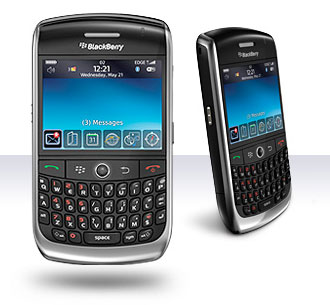
BlackBerry Pearl owners say "D'oh!" The Curve is just as slim as the Pearl (0.6 inches), and at 3.9 ounces it's only 0.7 ounces heavier. It slips easily into a pocket, no geeky hip holster required. Granted, at first glance this device doesn't seem as deserving of an iconic name as the Pearl, but the Curve's liquid-silver finish with chrome accents and rounded edges make it an attractive alternative to the Samsung BlackJack.
More important, RIM managed to squeeze in a full-sized backlit keyboard, one that makes the Curve noticeably wider than but also much more reliable than the Pearl, whose not-so-SureType keyboard doesn't always accurately guess the word you're trying to peck. In just a few minutes we were typing e-mails and entering Web addresses at a brisk pace, thanks to the Curve's well-spaced layout. Just like the Pearl and the 8800, the Curve has a trackball for simple (if sometimes erratic) menu navigation.
The 2.5-inch, 320 x 240-pixel display did a superb job rendering everything from Web pages and maps to photos and videos. The rest of the design is pretty straightforward. A standard 3.5mm stereo jack, a USB port, and a push-to-talk key line the left side of the Curve, and the volume buttons and camera-launch key are on the right side.
Spesifikasi BlackBerry Curve


Still offering an attractive design and excellent messaging capabilities, the addition of GPS makes the RIM BlackBerry Curve 8310 an even more attractive choice for road warriors.
Review:
Editor's note: This review has been updated to include the results of our battery drain testing.
Back in May, we fell in love with the original RIM BlackBerry Curve, but a recent refresh of the smartphone has our hearts pitter pattering all over again. The RIM BlackBerry Curve 8310 keeps the same sleek design and robust messaging capabilities of its predecessor, but then adds GPS capabilities. The ability to use your smartphone as a navigation device is particularly useful for mobile professionals who are constantly on the road, running to meetings or traveling for business trips
review of Blackberry Curve


Research In Motion (RIM) (NASDAQ: RIMM; TSX: RIM) today announced the new BlackBerry® Curve™ 3G, an exciting addition to the popular BlackBerry Curve series of smartphones. Designed to provide the growing mass of smartphone purchasers with a distinctly powerful, approachable and affordable choice, the BlackBerry Curve 3G supports high-speed 3G (HSDPA) networks around the world and gives users the exceptional communications features they need to accomplish more than ever, when they’re at home, at work and everywhere in-between.
“The BlackBerry Curve 3G is both an accessible and feature-rich smartphone which will be popular with many customers in Indonesia who highly value communications and productivity tools that help them get ahead of their day. With the ability to connect to 3G and Wi-Fi networks, users can access information and communicate quickly with the people that matter, as well as take advantage of useful features like built-in GPS to share their location on BBM and social networking sites,” said Gregory Wade, Managing Director, South East Asia, RIM.
The BlackBerry Curve 3G smartphone features a comfortable full-QWERTY keyboard for fast, accurate typing, optical trackpad for fluid navigation, built-in GPS and Wi-Fi®, as well as dedicated media keys, so music lovers can easily access their tunes while on the go. The new smartphone also features a camera that can record video and a microSD/SDHC slot that supports up to 32 GB memory cards for media storage. Support for 3G networks makes browsing faster, streaming music smoother, and gives users the ability to talk on the phone while they browse the web or instant message with BlackBerry® Messenger (BBM™).
The BlackBerry Curve 3G ships with BlackBerry® 5 and is BlackBerry® 6 ready. BlackBerry 6 is a new operating system for BlackBerry® smartphones that was announced last week. It retains the trusted features that distinguish the BlackBerry brand while delivering a fresh and engaging experience that is both powerful and easy to use. BlackBerry 6 is expected to be available for the BlackBerry Curve 3G, subject to carrier certifications, in the coming months.
The new BlackBerry Curve 3G smartphone (model 9300) is expected to be available in Indonesia from September.
For more information about the new BlackBerry Curve 3G smartphone visit www.blackberry.com/curve3G.
Jumat, 25 Maret 2011
Harga HP BlackBerry Curve
BLACKBERRY 9300 Curve 3G - Graphite Grey by TAM
Smart Phone
512MHz Processor, Quad Band, TFT 65K Colors, GPRS, HSDPA, Bluetooth, 2MP Camera, MP3 Player, Video, FM Radio, 256MB RAM, microSD slot, Wi-Fi, BlackBerry OS 5.0, QWERTY Keyboard
Rp 2,885,000
Smart Phone
512MHz Processor, Quad Band, TFT 65K Colors, GPRS, HSDPA, Bluetooth, 2MP Camera, MP3 Player, Video, FM Radio, 256MB RAM, microSD slot, Wi-Fi, BlackBerry OS 5.0, QWERTY Keyboard
Rp 2,885,000
DAFTAR HARGA BLACKBERRY CURVE
Detail Spesifikasi BlackBerry Curve 8300
| General HandPhone Information | |
| Dimension - Dimensi | 107x60x15.5 mm |
| Colour - Warna | Black |
| Phone Weight / Volume | 111 gram / 100 cc |
| Network System - Sistem Jaringan | |
| 2G Network | GSM 850 / 900 / 1800 / 1900 |
| 3G Network | |
| CPU Processor Speed | |
| CPU Processor Type | |
| Sistem Operasi | BlackBerry OS |
| Versi Interface GUI | |
| BlackBerry Curve 8300 Memory System | |
| Memory Internal | 64 MB |
| Memori Eksternal | microSD (TransFlash) |
| Memory Include | |
| Phone Book | Yes, Photocall |
| Call Records | Yes |
| Opsi Memory | |
| Layar Display & Input | |
| Jenis Layar / Warna | , 65 ribu warna |
| Resolusi Layar | 320 x 240 pixels |
| Ukuran Display | |
| Layar Tambahan Opsional | |
| Qwerty Keyboard | Yes |
| Touch Screen / Layar Sentuh | No |
| Opsi Layar & Input method | - Full QWERTY keyboard - Trackball navigation - Wallpapers |
| Kamera BlackBerry Curve 8300 | |
| Resolusi kamera BlackBerry Curve 8300 | 2 MP [ 1600 x 1200 pixels ] |
| Secondary Camera | No |
| Fitur Kamera | LED flash |
| Perekam Video | Yes |
| Network Data and Conectivity | |
| HSCSD | |
| GPRS | Yes |
| EDGE | Yes |
| UMTS / HSDPA /HSUPA | |
| WLAN - Wi-Fi | |
| USB | |
| Infrared | No |
| Bluetooth | 2.0 |
| Kabel data BlackBerry Curve 8300 | |
| Multimedia and Audio Musik | |
| Ringtones | Vibration; Downloadable polyphonic, MP3 ringtones |
| Speaker phone | |
| Radio Support | No |
| Audio & Multimedia Option | - 3.5 mm stereo output jack |
Harga Blackberry curve 8300 baru Harga Rp. 3.200.000
Harga Blackberry curve 8300 second Harga Rp. 1.300.000
Rabu, 16 Maret 2011
HARGA HP BLACKBERRY TERBARU
Harga blackberry bold, blackberry gemini, curve, storm, torch, onyx, tour, pearl, javelin terbaru 2011. Review spesifikasi harga blackberry second. 


gambar hp blackberry Berita IT dan Artikel
DAFTAR HARGA BLACKBERRY INDONESIA TERBARU 2011 TIPE BLACKBERRY BlackBerry Curve 8310 BlackBerry Curve 8320 BlackBerry Curve.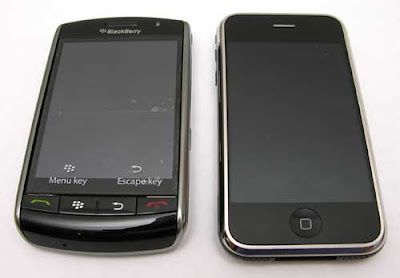

Selasa, 01 Maret 2011
BlackBerry - Tips and Tricks for the BlackBerry Bold 9000
The BlackBerry Bold 9000 is also known as: BlackBerry 9000 Bold, BlackBerry Bold.
* Specifications cannot be guaranteed accurate. Please do your own research before buying a phone. Cell phone makers do not always detail all their phone's functions, making it difficult for us to guess whether or not a specific cell phone has a specific function. If you spotted an inaccuracy in this BlackBerry Bold 9000 description, please let us know as soon as possible.

Selasa, 01 Februari 2011
Body Glove Silicone Case for BlackBerry Bold 9000
The Body Glove Silicone protective case offers great protection for your phone. This slim case features soft, rubberized material that is easy to grip and shields your phone from bumps and scratches.
- Strong, tear-resistant case
- Soft, rubberized material
- Slim and sleek
- Includes "Kick-Stand" Belt clip
Works with: BlackBerry Bold 9000
BlackBerry Bold 9000 Accessories
Find a full selection of BlackBerry Bold 9000 Accessories to optimally carry and charge your BlackBerry smartphone, maximize battery life as well as work and play-hard with the easiest to use hands-free wired and Bluetooth headsets. Keep your BlackBerry Bold 9000 secure with carrying cases, from convertible cases that offer functionality, quality and style to super-thin protective covers available in a multitude of vibrant colors to keep your BlackBerry smartphone safe and looking great in every situation. Upgrade your BlackBerry Bold 9000 memory card, that will provide a convenient way to store, move, manage and play more content on your BlackBerry smartphone. Screen protectors allow users to protect their BlackBerry LCD screen from scratches and dings and Signal Boosters are available to allow users phone signals and data to reach distant towers and experience more miles of uninterrupted service on the road
Minggu, 19 Desember 2010
KODE-KODE RAHASIA BLACKBERRY
Tahukah kamu bahwa ada kode-kode rahasia yang dapat menampilkan informasi atau mengaktifkan fitur tersembunyi pada handheld blackberry kamu?
Sebenarnya ada cukup banyak kode-kode tersembunyi yang dapat mengoptimalkan pencarian informasi maupun fungsi pada blackberry, seperti untuk menampilkan event log, mengubah sinyal bar menjadi decibels, dan masih banyak lagi.
Berikut adalah beberapa kode rahasia pada Blackberry kamu:
• Name: Decibel meter.
• Description/ purpose: Displays your signal strength in decibels, instead of bars.• Process: Hold "Alt" and press "N", "M", "L", "L" (repeat to reverse the effect).
• Name: Address Book file verification.
• Description/ purpose: Checks the data in your Address Book for inconsistencies.
• Process: In the Address Book, hold "Alt" and press "V", "A", "L", "D".
• Name: Address Book data structure rebuild.
• Description/ purpose: Forces a data structure re-build in the Address Book...
• Process: In the Address Book, hold "Alt" and press "R", "B", "L", "D".
• Name: View source code.
• Description/ purpose: Displays the source code of a Web page.
• Process: In the Browser, hold "Alt" and press "R", "B", "V", "S".
• Name: Help Me! menu.
• Description/ purpose: Provides crucial technical information about your device, for when seeking technical support or help in forums...
• Process: Hold "Alt" and (left) "shift", then press "H".
• Name: IMEI display.
• Description/ purpose: Displays your device's international mobile equipment identity (IMEI - your serial number) on-screen... Also works from all other GSM handsets.
• Process: Type "*", "#", "0", "6", "#" on the Home screen.
• Name: "Soft" reset.
• Description/ purpose: Performs a "soft" reset of your device; the equivalent of doing a "battery pull" (ie. Removing the battery for a few seconds).
• Process: Press-and-hold "Alt", then press-and-hold (left) "shift", then press-and-hold "Del".
• Name: Event Log.
• Purpose: Displays event logs of all the system-level events that occur on your device...
• Process: Hold "Alt" and press "L", "G", "L", "G".
• Mengubah lambang sinyal dari bar ke numeric : ALT + N M L L (Sure Type : ALT + N N M L L) pada home screen.
• Melihat Data Usage dan Voice Usage : B U Y R (Sure Type : B U T T E R) pada [option],[Status]
• Melihat Refld dan ServiceUserId : ALT + V I E W (Sure Type ALT + V V I I E W W) pada saat membuka message.
• Melihat Event Log ALT + L G L G pada home screen.
• Menampilkan Help Me : ALT + CAP + H (Sure Type : ALT + R A C E) pada home screen.
• Menampilkan informasi SIM Card : M E P D (Sure Type : M E P P D) pada [options],[advanced options],[SIM Card].
You can also obtain various types of information by entering smart code on your device. From your BlackBerry device go into messages and compose a new email, then enter one of the following smart codes in the text feild and press space.
Smart Codes:
Code: myver
Information Returned: Displays your devices model number and software version.
Code: LD
Information Returned: Displays the local date
Code: LT
Information Returned: Displays the local time
Code: mysig
Information Returned: Displays the information you entered in the
BlackBerry Options > Owner screen
Code: mypin
Information Returned: Displays your devices PIN
Silakan ditambahkan kalo ada yang berhasil mengungkap kode rahasia lain :)
Sebenarnya ada cukup banyak kode-kode tersembunyi yang dapat mengoptimalkan pencarian informasi maupun fungsi pada blackberry, seperti untuk menampilkan event log, mengubah sinyal bar menjadi decibels, dan masih banyak lagi.
Berikut adalah beberapa kode rahasia pada Blackberry kamu:
• Name: Decibel meter.
• Description/ purpose: Displays your signal strength in decibels, instead of bars.• Process: Hold "Alt" and press "N", "M", "L", "L" (repeat to reverse the effect).
• Name: Address Book file verification.
• Description/ purpose: Checks the data in your Address Book for inconsistencies.
• Process: In the Address Book, hold "Alt" and press "V", "A", "L", "D".
• Name: Address Book data structure rebuild.
• Description/ purpose: Forces a data structure re-build in the Address Book...
• Process: In the Address Book, hold "Alt" and press "R", "B", "L", "D".
• Name: View source code.
• Description/ purpose: Displays the source code of a Web page.
• Process: In the Browser, hold "Alt" and press "R", "B", "V", "S".
• Name: Help Me! menu.
• Description/ purpose: Provides crucial technical information about your device, for when seeking technical support or help in forums...
• Process: Hold "Alt" and (left) "shift", then press "H".
• Name: IMEI display.
• Description/ purpose: Displays your device's international mobile equipment identity (IMEI - your serial number) on-screen... Also works from all other GSM handsets.
• Process: Type "*", "#", "0", "6", "#" on the Home screen.
• Name: "Soft" reset.
• Description/ purpose: Performs a "soft" reset of your device; the equivalent of doing a "battery pull" (ie. Removing the battery for a few seconds).
• Process: Press-and-hold "Alt", then press-and-hold (left) "shift", then press-and-hold "Del".
• Name: Event Log.
• Purpose: Displays event logs of all the system-level events that occur on your device...
• Process: Hold "Alt" and press "L", "G", "L", "G".
• Mengubah lambang sinyal dari bar ke numeric : ALT + N M L L (Sure Type : ALT + N N M L L) pada home screen.
• Melihat Data Usage dan Voice Usage : B U Y R (Sure Type : B U T T E R) pada [option],[Status]
• Melihat Refld dan ServiceUserId : ALT + V I E W (Sure Type ALT + V V I I E W W) pada saat membuka message.
• Melihat Event Log ALT + L G L G pada home screen.
• Menampilkan Help Me : ALT + CAP + H (Sure Type : ALT + R A C E) pada home screen.
• Menampilkan informasi SIM Card : M E P D (Sure Type : M E P P D) pada [options],[advanced options],[SIM Card].
You can also obtain various types of information by entering smart code on your device. From your BlackBerry device go into messages and compose a new email, then enter one of the following smart codes in the text feild and press space.
Smart Codes:
Code: myver
Information Returned: Displays your devices model number and software version.
Code: LD
Information Returned: Displays the local date
Code: LT
Information Returned: Displays the local time
Code: mysig
Information Returned: Displays the information you entered in the
BlackBerry Options > Owner screen
Code: mypin
Information Returned: Displays your devices PIN
Silakan ditambahkan kalo ada yang berhasil mengungkap kode rahasia lain :)
Selasa, 30 November 2010
Tips n Trik agar Blackberry tidak cepat lemod (loading mulu, dll..) Source: Tips n Trik agar Blackberry tidak cepat lemod (loading mulu, dll..)... :
1. OTA Loader
Berguna banget buat download OTA link dari PC (apalagi kalo pas koneksi operator lagi jeblok), tinggal dimasukin link OTA’nya, trus klik tombol download. Download akan memasukkan semuanya ke dalam 1 folder yang harus anda kopikan ke MMC. Lalu tinggal dibuka deh file JAD’nya di BB anda.
2. Restart koneksi BB tanpa copat-copot baterai
Kepikir gak sih, kalau copat-copot baterai bikin tutup baterai BB lecek? Gw jarang copot baterai sekarang kalu mau restart jaringan operator. Masuk ke Option >> Mobile Network >> Network Selection Mode >> pilih Manual, dan pilihan bawahnya pilih Prompt. Jika anda merasa koneksi BB lemot, berhenti total, atau bahkan sinyal BB jadi “gprs/edge”, switch ajah (Scan For Available Network) ke operator lain (SOS signal will be appear) selama 2-3 detik dan kembalikan lagi ke operator anda semula, semuanya bakalan beres tanpa copat copot baterai lagi!
3. Keyboard Shortcut
Lihat theme’nya Storm yang punya 16 icon home screen, ckckckck…, cool sih, tapi masi perlu scrool2 sana sini juga kan, pakai keyboard shorcut dijamin lebih efektif! Pada menu Phone (klik tombol phone hijau), klik tombol BB, pilih Option, dan pada pilihan Dial from home screen pilih NO. Ini akan mematikan calling dari home screen, jadi kalo mau pakai phone harus pencet tombol phone hijau dulu, cuma 1 tombol doang, ga ngefek!!! Tapi efisiensi’nya jadi luar biasa ::
YM : y
MSN : x
BBM : n
Alarm : r
Browser : b
Keylock : k
Message : m
SMS / Search contact : c
Profile Chooser : f
Memo : d
Calculator : u, dsb….
Lama2 juga pasti apal dengan sendirinya
4. Memory Release (tentu saja tanpa copot baterai) untuk OS 4.5 up
Pernah gini gak sih, lg chat seru, donlod2 seru, tapi memory udah low (gw sering sampe tinggal 2mb’an) dan BB jadi lemot. Masa mau restart dulu, kelamaan kalee, coba cara dibawah ini :
- Close semua chat log yg udah ga kepake pada ym, msn, bbm, dsb (gw biasain abis slese chat langsung end conversation)
- Masuk Browser (b), klik tombol BB, masuk ke Option >> Chache Operations >> lalu pilih Clear History dan Clear2 lainnya
- Kembali ke home screen, klik tombol BB 1 kali (masuk ke application menu), lalu ALT + l,g,l,g,l,g dan akan masuk ke event log, klik tombol BB dan pilih clear log
- Masuk option (o), Security Option >> Memory Cleaning >> Status enabled >> Pilih Show Icon on Home Screen. Icon Memory Cleaning akan muncul dan bisa langsung di klik u/ memory cleaning.
Langkah diatas lumayan bisa ndapetin 2-3mb free memory secara instan.
5. Blackberry Hidden Keys
- ALT + LEFT SHIFT + H, ALT + RIGHT SHIFT + DEL, dan “buyr” pada Option rasanya udah tau yah…
- ketik ALT + L,G,L,G,L,G : tampilin event log, usefull banget buat debugging
- ketik ALT + N,M,L,L : tampilin signal bar dalam number (ketik sekali lagi u/ balik)
- ketik ALT + ESCAPE : switch beetween applications
- ketik “test” pada Option > status : melakukan self diagnostic test
- ketik “myver + (space/enter)” pada inputan text manapun (sms, ym, email, dsb) : tampilin versi BB + OS
- ketik “ld + (space/enter)” pada (idem) diatas : tampilin tanggal dan hari sekarang
- ketik “lt + (space/enter)” pada (idem) diatas : tampilin waktu sekarang (berguna banget buat ym ama ping)
- ketik “mypin + (space/enter)” pada (idem) diatas : tampilin PIN hh pas ditanya (gausa liat status dehh)
6. Fast Typing ala BB (hidup BB blogger)
- autotext : fungsi wajib buat typing, terutama type SURTY, harus rajin2 disekolahin fungsi ini
- SHIFT + Scrool Trackball (up/down) : select 1 line
- SHIFT + Scrool Trackball (left/right) : select per character
- ALT + klik Trackball (after selection) : copy
- ALT + klik Trackball (after selection) : cut
- SHIFT + klik Trackball (after cut/copy) : paste
- spasi 2X : “.” (period)
- press and hold character : Capitalize (A,B,C,D…..)
- press character + Scrool Trackball : Choose Special Character
- tekan T (view message / conversation history / page browser, etc) : Go to top of the page
- tekan Space (idem up) : Scrool diantara page, lumayan daripada scrool trackball terus2an…
- tekan B (idem up) : Go to end of the page
7. Email Confirmation Delivery
Buat yang sering kirim email dan ternyata dapat centang merah alias failed, padahal belum tentu message’nya nggak terkirim bisa coba tips ini :
- tambahin kata “” (tanpa tanda petik) di depan Subject saat mengirim email, biar enak masukin ke Auto Text saja
Mengubah lambang sinyal dari bar ke numeric : ALT + N M L L (Sure Type : ALT + N N M L L) pada home screen.
Melihat Data Usage dan Voice Usage : B U Y R (Sure Type : B U T T E R) pada [option],[Status].
Melihat Refld dan ServiceUserId : ALT + V I E W (Sure Type ALT + V V I I E W W) pada saat membuka message.
Melihat Event Log ALT + L G L G pada home screen.
Menampilkan Help Me : ALT + CAP + H (Sure Type : ALT + R A C E) pada home screen.
Menampilkan informasi SIM Card : M E P D (Sure Type : M E P P D)pada [options],[advanced options],[SIM Card].
Point ke -6 juga berguna untuk mengecheck apakah BB kita unlocked atau LOCKED. Kalau UNLOCKED, semua harus DISABLED. Kalau ada yg ENABLE, berarti masih LOCKED…
Alt+esc buat shortcut ke menu laen supaya lebih cepet…..
Alt+Cap+Del buat soft reset….
Berguna banget buat download OTA link dari PC (apalagi kalo pas koneksi operator lagi jeblok), tinggal dimasukin link OTA’nya, trus klik tombol download. Download akan memasukkan semuanya ke dalam 1 folder yang harus anda kopikan ke MMC. Lalu tinggal dibuka deh file JAD’nya di BB anda.
2. Restart koneksi BB tanpa copat-copot baterai
Kepikir gak sih, kalau copat-copot baterai bikin tutup baterai BB lecek? Gw jarang copot baterai sekarang kalu mau restart jaringan operator. Masuk ke Option >> Mobile Network >> Network Selection Mode >> pilih Manual, dan pilihan bawahnya pilih Prompt. Jika anda merasa koneksi BB lemot, berhenti total, atau bahkan sinyal BB jadi “gprs/edge”, switch ajah (Scan For Available Network) ke operator lain (SOS signal will be appear) selama 2-3 detik dan kembalikan lagi ke operator anda semula, semuanya bakalan beres tanpa copat copot baterai lagi!
3. Keyboard Shortcut
Lihat theme’nya Storm yang punya 16 icon home screen, ckckckck…, cool sih, tapi masi perlu scrool2 sana sini juga kan, pakai keyboard shorcut dijamin lebih efektif! Pada menu Phone (klik tombol phone hijau), klik tombol BB, pilih Option, dan pada pilihan Dial from home screen pilih NO. Ini akan mematikan calling dari home screen, jadi kalo mau pakai phone harus pencet tombol phone hijau dulu, cuma 1 tombol doang, ga ngefek!!! Tapi efisiensi’nya jadi luar biasa ::
YM : y
MSN : x
BBM : n
Alarm : r
Browser : b
Keylock : k
Message : m
SMS / Search contact : c
Profile Chooser : f
Memo : d
Calculator : u, dsb….
Lama2 juga pasti apal dengan sendirinya
4. Memory Release (tentu saja tanpa copot baterai) untuk OS 4.5 up
Pernah gini gak sih, lg chat seru, donlod2 seru, tapi memory udah low (gw sering sampe tinggal 2mb’an) dan BB jadi lemot. Masa mau restart dulu, kelamaan kalee, coba cara dibawah ini :
- Close semua chat log yg udah ga kepake pada ym, msn, bbm, dsb (gw biasain abis slese chat langsung end conversation)
- Masuk Browser (b), klik tombol BB, masuk ke Option >> Chache Operations >> lalu pilih Clear History dan Clear2 lainnya
- Kembali ke home screen, klik tombol BB 1 kali (masuk ke application menu), lalu ALT + l,g,l,g,l,g dan akan masuk ke event log, klik tombol BB dan pilih clear log
- Masuk option (o), Security Option >> Memory Cleaning >> Status enabled >> Pilih Show Icon on Home Screen. Icon Memory Cleaning akan muncul dan bisa langsung di klik u/ memory cleaning.
Langkah diatas lumayan bisa ndapetin 2-3mb free memory secara instan.
5. Blackberry Hidden Keys
- ALT + LEFT SHIFT + H, ALT + RIGHT SHIFT + DEL, dan “buyr” pada Option rasanya udah tau yah…
- ketik ALT + L,G,L,G,L,G : tampilin event log, usefull banget buat debugging
- ketik ALT + N,M,L,L : tampilin signal bar dalam number (ketik sekali lagi u/ balik)
- ketik ALT + ESCAPE : switch beetween applications
- ketik “test” pada Option > status : melakukan self diagnostic test
- ketik “myver + (space/enter)” pada inputan text manapun (sms, ym, email, dsb) : tampilin versi BB + OS
- ketik “ld + (space/enter)” pada (idem) diatas : tampilin tanggal dan hari sekarang
- ketik “lt + (space/enter)” pada (idem) diatas : tampilin waktu sekarang (berguna banget buat ym ama ping)
- ketik “mypin + (space/enter)” pada (idem) diatas : tampilin PIN hh pas ditanya (gausa liat status dehh)
6. Fast Typing ala BB (hidup BB blogger)
- autotext : fungsi wajib buat typing, terutama type SURTY, harus rajin2 disekolahin fungsi ini
- SHIFT + Scrool Trackball (up/down) : select 1 line
- SHIFT + Scrool Trackball (left/right) : select per character
- ALT + klik Trackball (after selection) : copy
- ALT + klik Trackball (after selection) : cut
- SHIFT + klik Trackball (after cut/copy) : paste
- spasi 2X : “.” (period)
- press and hold character : Capitalize (A,B,C,D…..)
- press character + Scrool Trackball : Choose Special Character
- tekan T (view message / conversation history / page browser, etc) : Go to top of the page
- tekan Space (idem up) : Scrool diantara page, lumayan daripada scrool trackball terus2an…
- tekan B (idem up) : Go to end of the page
7. Email Confirmation Delivery
Buat yang sering kirim email dan ternyata dapat centang merah alias failed, padahal belum tentu message’nya nggak terkirim bisa coba tips ini :
- tambahin kata “” (tanpa tanda petik) di depan Subject saat mengirim email, biar enak masukin ke Auto Text saja
Mengubah lambang sinyal dari bar ke numeric : ALT + N M L L (Sure Type : ALT + N N M L L) pada home screen.
Melihat Data Usage dan Voice Usage : B U Y R (Sure Type : B U T T E R) pada [option],[Status].
Melihat Refld dan ServiceUserId : ALT + V I E W (Sure Type ALT + V V I I E W W) pada saat membuka message.
Melihat Event Log ALT + L G L G pada home screen.
Menampilkan Help Me : ALT + CAP + H (Sure Type : ALT + R A C E) pada home screen.
Menampilkan informasi SIM Card : M E P D (Sure Type : M E P P D)pada [options],[advanced options],[SIM Card].
Point ke -6 juga berguna untuk mengecheck apakah BB kita unlocked atau LOCKED. Kalau UNLOCKED, semua harus DISABLED. Kalau ada yg ENABLE, berarti masih LOCKED…
Alt+esc buat shortcut ke menu laen supaya lebih cepet…..
Alt+Cap+Del buat soft reset….
Selasa, 23 November 2010
blackberry tips and tricks
Pertama, tekan tombol yg bergambar lambang Blackberry lalu pilih option lalu pilih status lalu ketik B U Y R, perhatikan DATA dan VOICE usage, kedua hal tersebut harus pada nominal NOL.
Kedua, teruskan dengan mengetik T E S T, lalu tekan trackball dan pilih start, centang seluruh bagian yg anda ingin test lalu pilih RUN, ikuti seluruh tahap sehingga anda bisa memastikan seluruh fungsi di blackberry tersebut berjalan dengan baik.
Fungsi – fungsi yg dapat di cek :
1. Keyboard dan trackball
2. Misc
3. Handset Audio
4. Headset Audio
5. Bluetooth Audio
6. RF Compartment
7. GPS
Untuk huruf gprs masih kecil belum GPRS :
Step by step :
1. Masuk ke Options>Advanced Options>Host Routing Table> pilih yg atas trus tekan logo BB pilih register now
2. Masuk ke Options>Mobile Network>Network Selection Mode> ganti ke manual
3. Pilih operator lain, tekan logo BB>save
4. Cabut batre
5. Ulangi step 1, ganti ke automatic
Untuk Shortcut :
Cara mengaktifkan :
Tekan tombol telefon yg berwarna hijau, tekan logo BB, pilih options>General Options> ganti pilihan Dial From Home Screen menjadi no, tekan logo BB>save
Shortcuts disusun sesuai keyboard layout secara horizontal :
Baris pertama :
Q : Tekan 1 detik -> profile menjadi vibrate, tekan 1 detik -> kembali normal
T : Task
Y : Yahoo Messenger
U : Calculator
O : Options
Baris kedua :
A : Contact
S : Search
D : Memopad
F : Pilih Profile
H : Help
K : Keypad lock
L : Calendar
Baris ketiga :
X : MSN
C : Membuat SMS
V : Saved Messeges
B : Internet Browser
N : Blackberry Messenger
M : Email Messeges gabungan
Kombinasi :
Alt + esc(tanda back disebelahnya end calls) : pindah aplikasi (application switcher)
Untuk Copy Paste :
1. Sorot kalimat/kata yg ingin di copy dengan menekan shift
2. Tekan alt dan trackball berbarengan (copy)
3. Taruh cursor ditempat yg ingin di paste
4. Tekan shift dan trackball berbarengan (paste)
Untuk Recalibrate Battery :
1. Charge sampai full
2. Pakai sampai habis
3. Pinjem batre temen, 3 menit copot
4. Kembalikan batre asli
5. Charge sampe penuh minimal 4 jam
(*kalo ada)
Merubah Signal Bar Menjadi Angka :
Tekan alt + N M L L pada home screen Blackberry Baru anda dan jreeengg..!!!.
Kedua, teruskan dengan mengetik T E S T, lalu tekan trackball dan pilih start, centang seluruh bagian yg anda ingin test lalu pilih RUN, ikuti seluruh tahap sehingga anda bisa memastikan seluruh fungsi di blackberry tersebut berjalan dengan baik.
Fungsi – fungsi yg dapat di cek :
1. Keyboard dan trackball
2. Misc
3. Handset Audio
4. Headset Audio
5. Bluetooth Audio
6. RF Compartment
7. GPS
Untuk huruf gprs masih kecil belum GPRS :
Step by step :
1. Masuk ke Options>Advanced Options>Host Routing Table> pilih yg atas trus tekan logo BB pilih register now
2. Masuk ke Options>Mobile Network>Network Selection Mode> ganti ke manual
3. Pilih operator lain, tekan logo BB>save
4. Cabut batre
5. Ulangi step 1, ganti ke automatic
Untuk Shortcut :
Cara mengaktifkan :
Tekan tombol telefon yg berwarna hijau, tekan logo BB, pilih options>General Options> ganti pilihan Dial From Home Screen menjadi no, tekan logo BB>save
Shortcuts disusun sesuai keyboard layout secara horizontal :
Baris pertama :
Q : Tekan 1 detik -> profile menjadi vibrate, tekan 1 detik -> kembali normal
T : Task
Y : Yahoo Messenger
U : Calculator
O : Options
Baris kedua :
A : Contact
S : Search
D : Memopad
F : Pilih Profile
H : Help
K : Keypad lock
L : Calendar
Baris ketiga :
X : MSN
C : Membuat SMS
V : Saved Messeges
B : Internet Browser
N : Blackberry Messenger
M : Email Messeges gabungan
Kombinasi :
Alt + esc(tanda back disebelahnya end calls) : pindah aplikasi (application switcher)
Untuk Copy Paste :
1. Sorot kalimat/kata yg ingin di copy dengan menekan shift
2. Tekan alt dan trackball berbarengan (copy)
3. Taruh cursor ditempat yg ingin di paste
4. Tekan shift dan trackball berbarengan (paste)
Untuk Recalibrate Battery :
1. Charge sampai full
2. Pakai sampai habis
3. Pinjem batre temen, 3 menit copot
4. Kembalikan batre asli
5. Charge sampe penuh minimal 4 jam
(*kalo ada)
Merubah Signal Bar Menjadi Angka :
Tekan alt + N M L L pada home screen Blackberry Baru anda dan jreeengg..!!!.
Langganan:
Postingan (Atom)